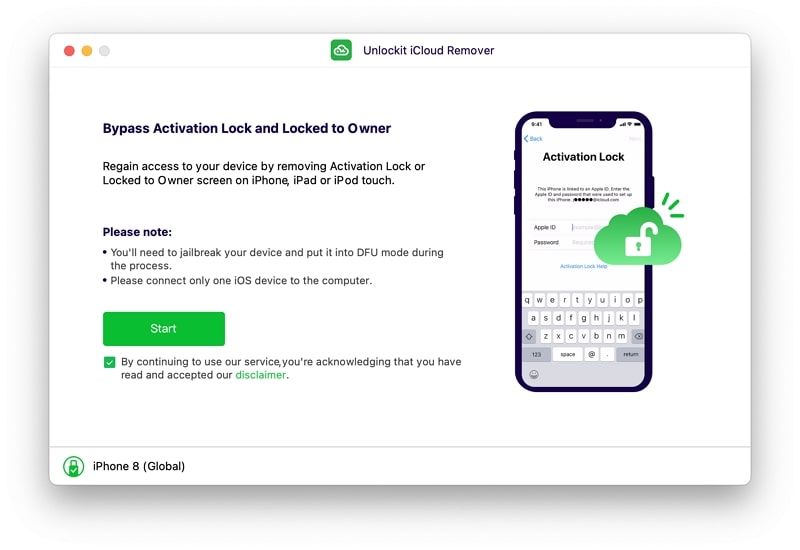
iCloud Remover is a specialized software tool designed to help users manage iCloud-related restrictions on Apple devices. It is commonly used when users encounter issues with iCloud activation, account verification, or device access after a reset or ownership change. The software aims to simplify the process of handling certain iCloud lock situations and restoring access to supported devices.

Many Apple devices are protected by Apple’s security system, which links a device to an iCloud account. This feature helps prevent unauthorized access and protects personal information if a device is lost or stolen. There are situations where legitimate owners may have difficulty accessing their devices, such as forgetting account details, purchasing a used device with unresolved account information, or facing activation-related problems. iCloud Remover is designed to assist in these scenarios.
The software typically provides a straightforward interface that guides users through the available options. Most tools in this category focus on simplifying complex procedures so that users can complete tasks without advanced technical knowledge. Clear instructions and step-by-step workflows help reduce confusion during the process.
iCloud Remover for mac is ability to save time compared to performing manual troubleshooting methods. Instead of searching through multiple settings and recovery procedures, users can access various functions from a single application. This can make device management more convenient and efficient.
iCloud Remover download 2026 support multiple Apple device models and different versions of iOS. Compatibility may vary depending on the software edition, device model, and operating system version. Users are generally advised to check compatibility information before starting any operation.
The software is often designed with ease of use in mind. Simple menus, organized controls, and guided procedures allow users to navigate the program with minimal effort. This makes it suitable for both beginners and more experienced users who need a quick solution for device-related issues.
Some editions may also include additional utilities for device information management, activation status checking, or system-related functions. These extra tools can help users better understand the condition and status of their devices before making changes.
Performance is another important aspect. Modern versions are optimized to complete tasks quickly while maintaining a stable user experience. Efficient processing helps reduce waiting times and improves overall usability.
Users should ensure they have legal ownership and authorization to manage the device before using such tools. Following applicable laws, service terms, and manufacturer policies is important when working with device management software.
Download iCloud Remover Free is designed to provide a convenient way to address certain iCloud-related access and activation challenges.
Features:
iCloud Account Status Check
- Displays iCloud activation and account status.
- Helps users identify account-related issues.
Device Information Viewer
- Shows device details such as model, serial number, and iOS version.
- Provides useful information for troubleshooting.
Activation Issue Diagnosis
- Helps identify common activation problems.
- Guides users through possible solutions.
User-Friendly Interface
- Simple design that is easy to navigate.
- Suitable for both beginners and advanced users.
Multiple Device Support
- Compatible with various iPhone, iPad, and iPod models.
- Supports different iOS versions, depending on the software release.
Fast Scanning Process
- Quickly analyzes device information and account status.
- Reduces troubleshooting time.
Guided Recovery Assistance
- Provides step-by-step instructions for account recovery procedures.
- Helps users regain access through official recovery methods.
Automatic Device Detection
- Recognizes connected Apple devices automatically.
- Simplifies setup and operation.
Detailed Status Reports
- Generates information about device activation and account conditions.
- Helps users understand existing issues.
Regular Updates
- Receives updates to improve compatibility and performance.
- Supports newer devices and software versions when available.
Secure Operation
- Designed to protect device information during supported operations.
- Focuses on safe and reliable device management.
Technical Support Integration
- May include access to documentation and support resources.
- Helps users resolve common problems more efficiently.
Compatibility Checking
- Verifies whether a device is supported before performing operations.
- Prevents unnecessary errors and interruptions.
Time-Saving Tools
- Combines multiple troubleshooting functions in one application.
- Makes device management more convenient.
Simple Setup Process
- Easy installation and configuration.
- Allows users to begin troubleshooting quickly.
System Requirements:
- Operating System: Windows 7, 8, 10, or 11 (64-bit recommended)
- Processor: 1 GHz Intel or AMD processor or faster
- Memory (RAM): 2 GB minimum (4 GB or more recommended)
- Storage Space: 200 MB of free disk space
The post Icloud Remover 4.8.0 + [Latest 2026] appeared first on FreeProSoftz.

No comments:
Post a Comment